Hi Orion Team,
I have been using Orion on my iPad, but after updating to version 1.5.0, I encountered a major usability issue.
When using the iPad in portrait orientation, both the tab bar and the bookmarks bar disappear completely from the top of the screen (and controls are pushed to a bottom compact bar). They are now only visible at the top when the iPad is in landscape orientation.
This UI change makes using Orion in portrait mode very frustrating for daily workflow, as having the full tab bar and quick access to bookmarks visible at the top is crucial regardless of device orientation.
Could you please add an option in Settings to keep the desktop-style tab bar and bookmarks bar visible at the top in portrait mode, or revert this
Thank you for your help and for building Orion!
Device Details:
App: Orion for iOS/iPadOS 27 public beta 2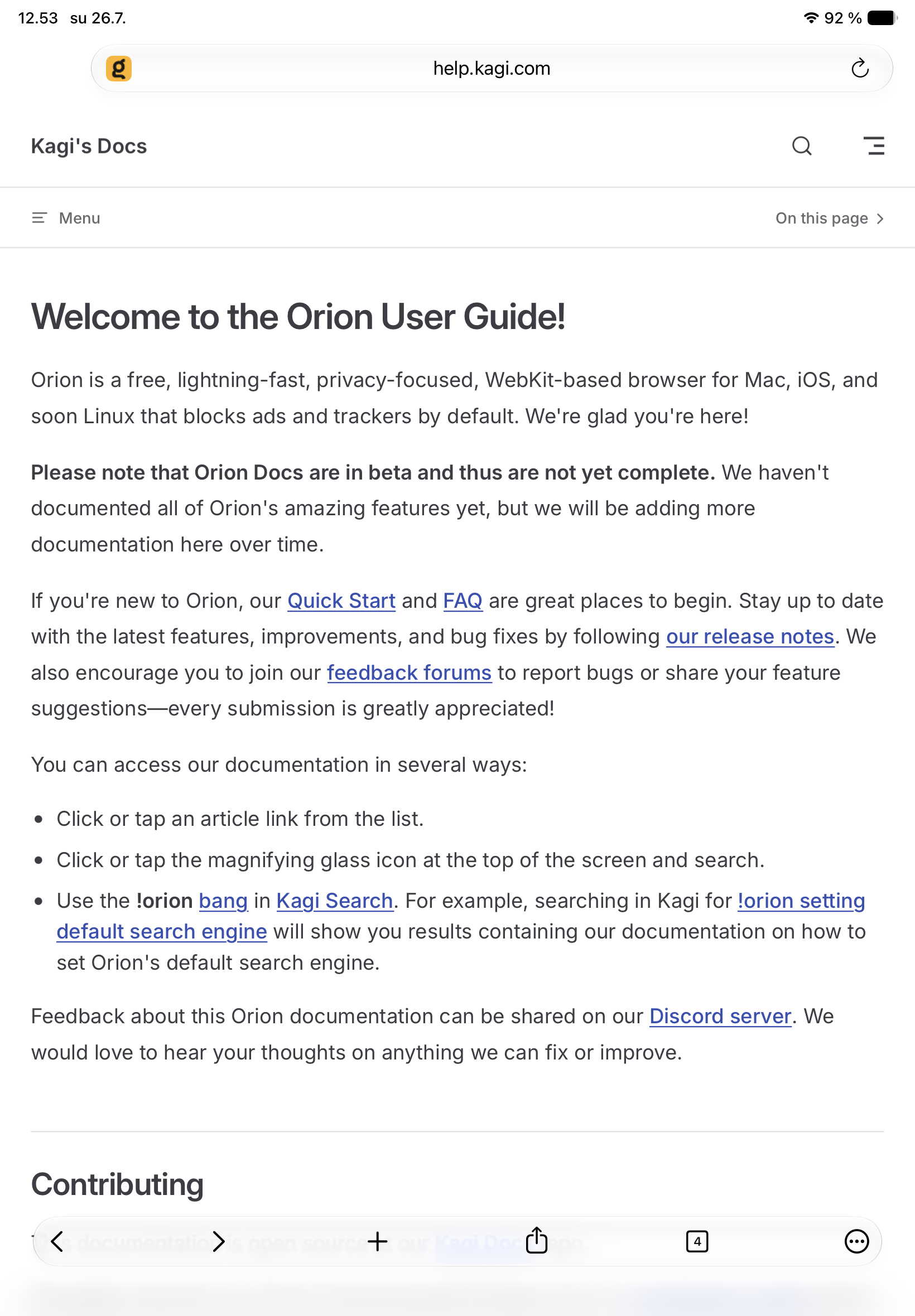
App Version: 1.5.0
Device: iPad,
I expected the tab bar and bookmarks bar to remain visible at the top of the screen in portrait orientation, just as they are in landscape mode and in previous versions.
I would like an option in the settings to keep the top desktop-style interface (with visible tabs and bookmarks bar) enabled in portrait mode on iPad, rather than switching to the compact mobile bottom toolbar layout.
1.5.0
26
