I've recently started using Orion, and first thing I noticed is that when I use Slack, each notification makes a "Plopp" sound even if the website doesn't play any sound with that notification. It essentially makes it impossible to disable notification sounds from the website itself.
Here is how I set-up my Slack, the same settings on Chrome makes no sound when a notification appears:
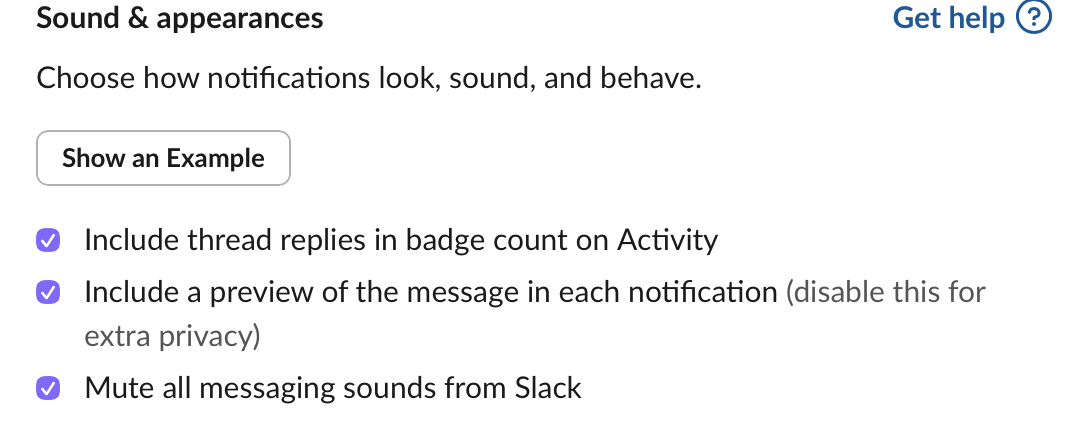
The same website on Orion with the same settings makes a sound.
Just to confirm this isn't a Slack problem, I've tried it with a test page at https://support.brave.app/hc/en-us/articles/360058972091-Push-Notification-Test , it makes the same sound with each notification.
Maybe I'm missing something, but I couldn't find a way to disable notification sounds on a per website basis, and the website itself seems to not be able to disable sounds.
I was able to disable all notification sounds from Orion through MacOS Settings, but that's far from ideal because:
- Like most, I get many messages on Slack, it'd be very distracting to get a sound effect for each Slack message.
- I also use time-critical apps like Google Calendar, where I'd definitely want to get a sound effect before my meetings start so I don't miss any.
Before on Chrome I could simply set Slack to not make any sounds and Calendar to make sounds, and both would work as intended.
I think this would be a pretty common use case to consider.
Options selected on the individual websites actually have an effect whether notification sounds played or not.
Version 1.0.0 (139), WebKit 623.1.8.0.0
Tahoe (26)
