When displaying a Shopify shopping cart in Desktop Orion, checkboxes disappear when selected. This does not occur in Orion on iOS. It does not occur in Safari.
As an example:
Go to https://feetures.com
Add an item to your cart
Select Checkout
Below the email field there is a checkbox to sign up for emails. When unchecked you can see the outliine of the checkbox. When checked, the checkbox disappears.
Further down the page, there is a checkbox for joining the SMS club. The behavior is the same.
Further down the page, there is a checkbox for saving my information for a faster checkout. The behavior is the same.
I have seen this behavior on other Shopify shopping carts in Orion. Feetures is just a recent example. I have also seen the disappearing behavior with radio buttons in the past, but I don't have an example to share at the moment.
It is particularly concerning when the checkbox is already selected when the form loads. You may be signing up for something or agreeing to something without knowing there is a checkbox there and already selected.
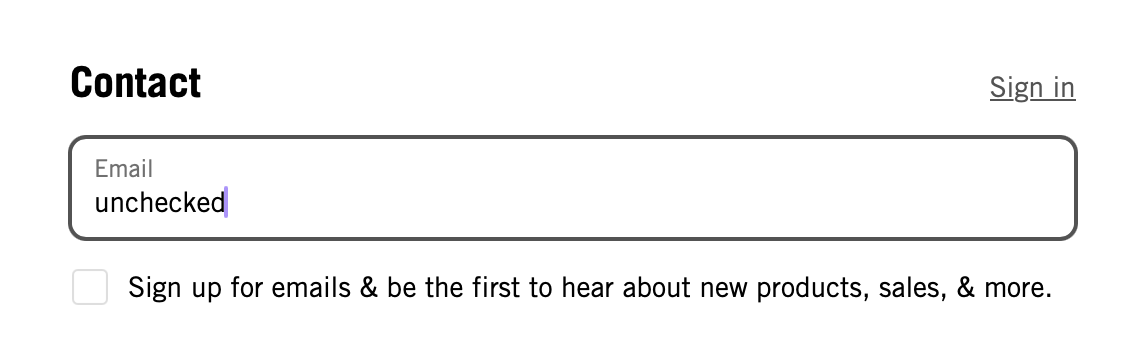
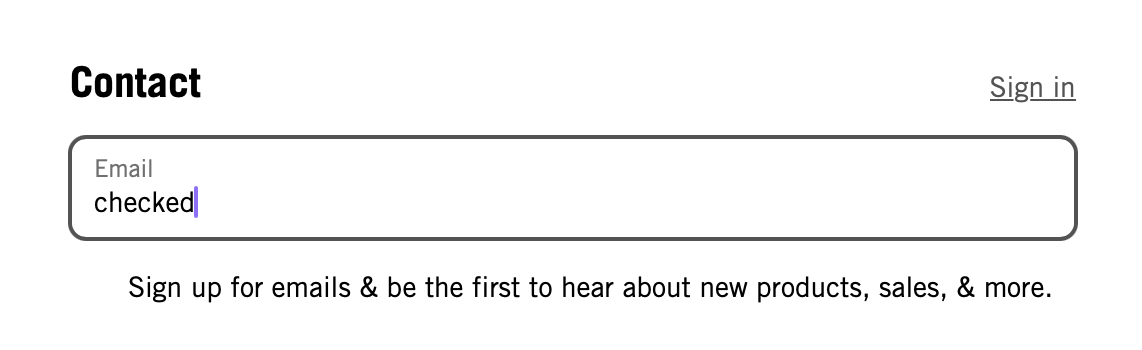
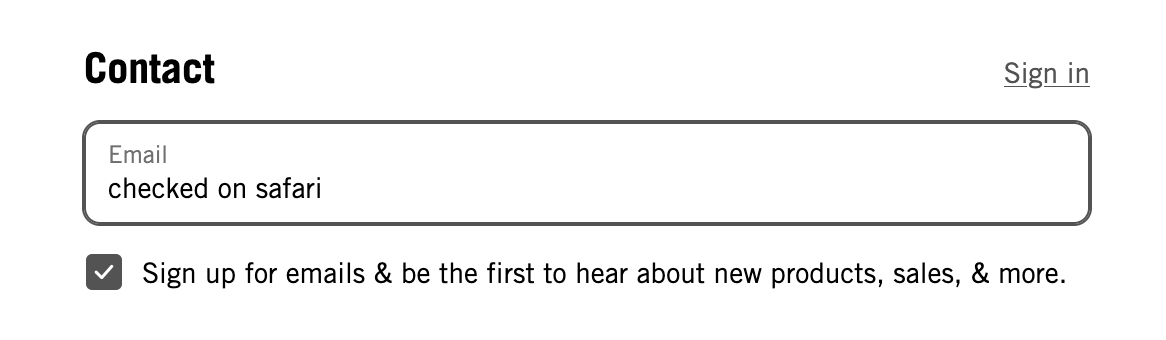
When selected, the checkbox should appear in the checked state. It should not disappear. This is how it works in Safari and Firefox and Orion on Mobile.
Version 0.99.138-beta, Tahoe 26.1
Tahoe (26)
