Hi! Yes, it happens on both iOS and macOS. A quick way to reproduce it on desktop is to have some open tabs, quit Orion, then open Orion again. All tabs but the one being viewed are now suspended. For iOS tabs, the tabs don't show as suspended on the mobile version of Orion, but they do when I try to view them from desktop.
Both simply leaving tabs open and not viewing them for an extended period of time or closing Orion and opening it again seems to reproduce the problem of tabs suspending despite low-power mode being disabled. Perhaps tabs suspending is a function of my laptop going into sleep mode? Though I'm not sure how or why that would affect Orion's behavior regarding tabs.
This happens every day.
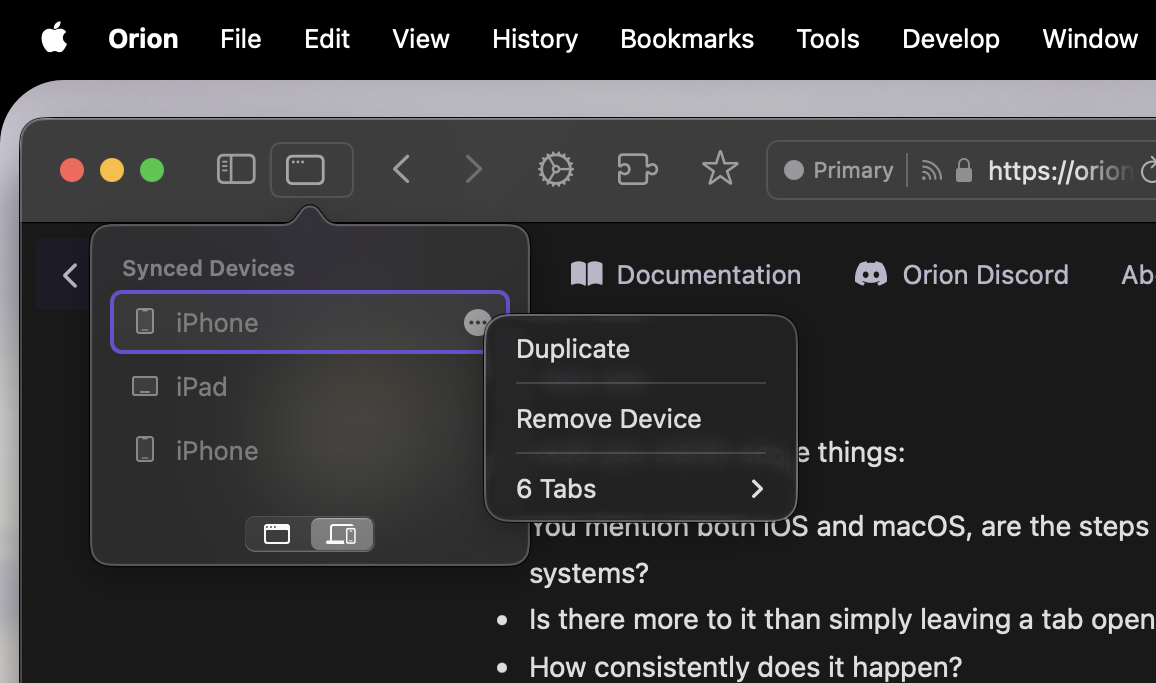
As you can see in this screenshot, desktop Orion is showing 6 open tabs on the selected iPhone. That iPhone actually has 50 open tabs. Those 6 tabs are just the ones I've viewed recently. The other tabs don't show the suspended icon on my iPhone, but when I click on that iPhone in the list on desktop, it opens a window with all 50 tabs—all but 6 of which show as suspended. I don't want to have to open a window with all 50 tabs, I want all the tabs that are open on my iPhone to show on the list on desktop so I can select the one I want. They aren't showing because desktop is seeing them as suspended despite mobile seemingly not (since the suspended icon isn't appearing on the tabs on my iPhone). I have low-power mode disabled on all devices, so I'm not sure why tabs are suspending at all.
Does that make sense? I hope I'm explaining myself well. With low-power mode disabled, I expect tabs to never suspend. Pinning is a lot of work when you have several hundred tabs open across at least 4 or 5 devices.
