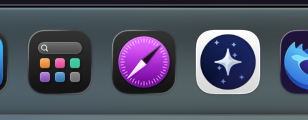
On macOS 26.2, Orion (version 1.0.2 / build 141) does not switch its app icon to the dark variant when using the system app icon appearance settings.
Transparent and tinted/colored icon modes work as expected, but selecting the Dark icon appearance does not affect the Orion app icon. The icon remains in its standard (light) appearance.
Steps to reproduce:
- Open macOS System Settings
- Go to Appearance / App Icon Appearance
- Select Dark icon appearance
- Observe the Orion app icon in the Dock or Applications folder
The issue occurs consistently. Safari correctly switches to its dark app icon under the same system settings, indicating that macOS supports this behavior.
When the macOS app icon appearance is set to Dark, Orion should switch to its dark icon variant, consistent with system behavior and other native macOS applications.
Orion 1.0.2 (141), macOS 26.2
Tahoe (26)