If I set "Show warning before quitting":
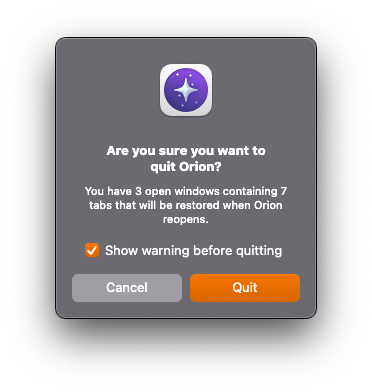
and then update to a new release of Orion, the confirmation dialog appears at the end of the update process. But I have already clicked the "install update" button on the dialog displaying the release notes, then clicked a "restart and install" button once the update has been downloaded and applied. It's a pointless extra step here; the intention of enabling it was to not have Orion quit if I hit ⌘Q when I meant to hit ⌘A or ⌘W.
The dialog also blocks system restarts/shutdowns. As I've already confirmed that the restart/shutdown should close all my apps, it means I have to hang around watching the entire process until Orion has thrown its prompt.
Additionally, this makes an automatic shutdown triggered by the UPS battery running low not complete as it's blocked— meaning that when the battery runs out completely, macOS will but shut down uncleanly and potentially corrupting data. Avoiding this scenario is one of the main reasons for using a UPS.
Automatic macOS updates that require a reboot would also be blocked by this (though this doesn't affect me as I don't have that enabled)
Orion should not show the quit confirmation dialog if it is appearing as a result of a restart caused by a user updating Orion and manually confirming that update.
There should be an option for the quit confirmation dialog to not appear for system shutdowns/restarts — or Orion should just not show the dialog in these cases (like Chrome's quit confirmation).
Version 0.99.134-beta (WebKit 622.1.9.19.2) Build date June 10, 2025 Mac Studio (macOS Sequoia 15.5 build 24F74)
Sequoia (15)
