Summary
Several text elements in the Orion Browser Settings > Sites menu display English text despite the app language being set to Russian, creating an inconsistent user experience.
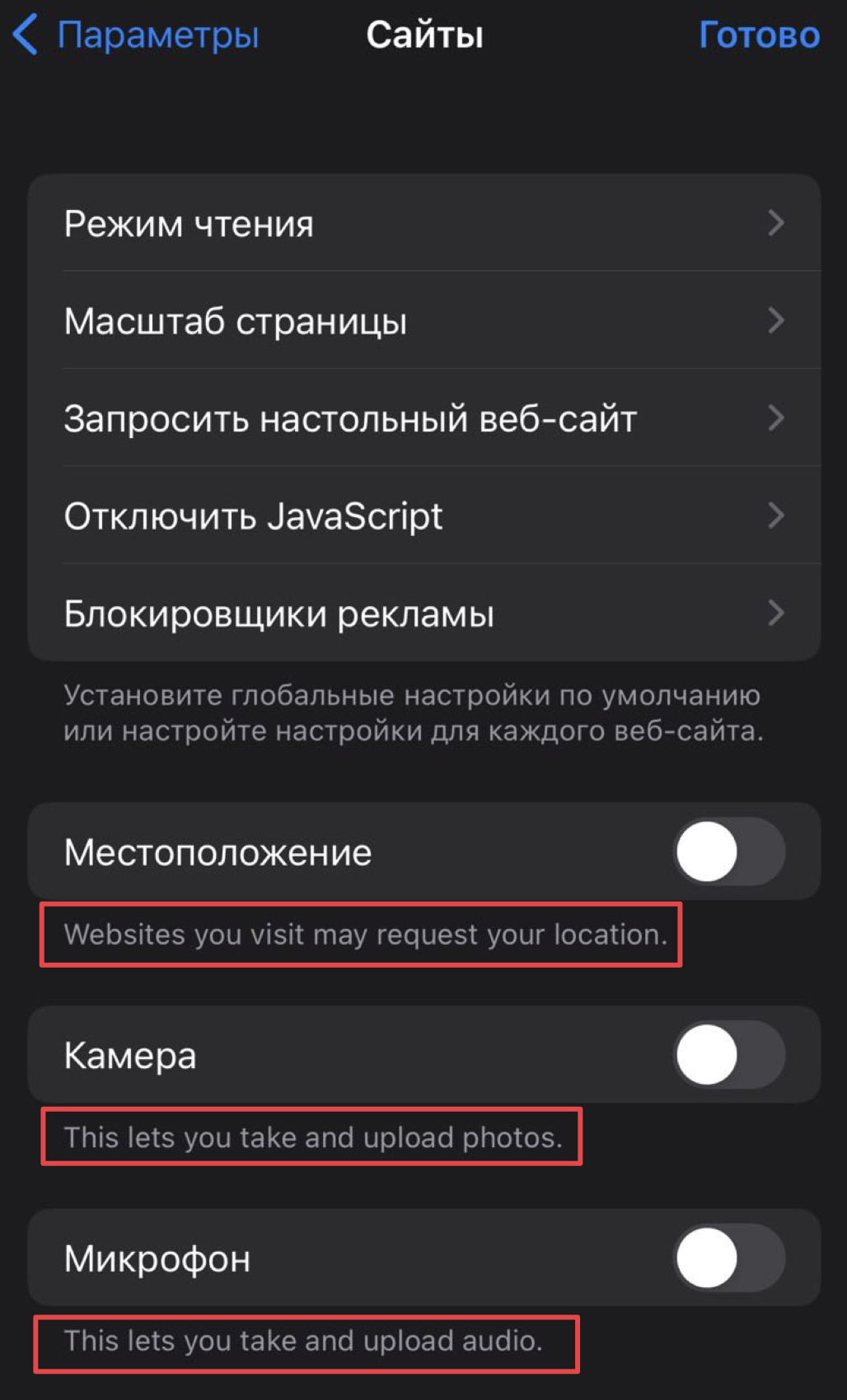
Description
In the Settings > Sites section of the Orion Browser for iOS, while most menu items and headers are properly translated to Russian, there are multiple instances where English text is displayed instead of Russian translations. This localization issue affects primarily descriptive text below toggle options.
Steps to Reproduce
- Set device language to Russian
- Open Orion Browser for iOS
- Navigate to Settings (Параметры)
- Select Sites (Сайты)
- Observe the mixed Russian/English interface
Observed Issues
- The main navigation and menu items are correctly displayed in Russian ("Параметры", "Сайты", "Готово", etc.)
- All toggle option titles are properly translated ("Местоположение", "Камера", "Микрофон", etc.)
- However, the descriptive text under these toggles remains in English:
- "Websites you visit may request your location" (under Местоположение)
- "This lets you take and upload photos" (under Камера)
- "This lets you take and upload audio" (under Микрофон)
Impact
This partial translation creates an inconsistent user experience for Russian users and may cause confusion about the functionality of these settings, particularly for users who don't understand English.
Expected Behavior
All text elements in the Settings > Sites menu should be displayed in Russian when the app language is set to Russian, including the translations provided above.
Screenshots
The attached screenshot shows the mixed language interface with Russian headings but English descriptive text.
Environment
OS: Apple iOS 16.6.1
App: Orion Browser by Kagi
Version: 1.3.23 (1) (WebKit 8615.3.12.10.2)
Platform: iOS
Language setting: Russian
Orion RC .3.23 (1) (WebKit 8615.3.12.10.2) ; Apple iOS 16.6.1
16
