Description
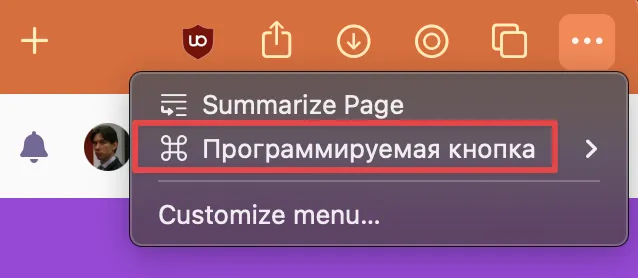
The item "Programmable Button" under the three dot menu (in the upper right corner) fails to revert to English when switching the browser language back to English from another language (Russian in this case). The label remains displayed in the previously selected language ("Программируемая кнопка") even after changing settings and restarting the browser.
Steps to Reproduce
- Open Orion Browser
- Change language from English to Russian
- Click the three-dot menu button in the upper right corner
- Verify that "Programmable Button" is now displayed as "Программируемая кнопка"
- Change language back to English
- Restart the browser
- Click the three-dot menu button again
- Observe that the label still appears as "Программируемая кнопка" instead of reverting to "Programmable Button"
Expected Behavior
After changing the language back to English and restarting the browser, all UI elements including the "Programmable Button" label should display in English.
Actual Behavior
The "Programmable Button" label remains in Russian ("Программируемая кнопка") even after switching back to English and restarting the browser.
Visual Evidence
The submitted screenshot clearly shows the menu with "Программируемая кнопка" label persisting in Russian while other menu items appear to be properly localized.
Impact
This issue affects the user experience for multilingual users who switch between language settings, creating an inconsistent interface where some elements remain in previously selected languages.
Additional Notes
The issue appears to be specific to this particular UI element, suggesting a possible oversight in the localization string table or a caching issue that prevents proper reloading of language resources for this element.
Configuration
- Browser: Orion Browser
- Version: 0.99.133.1-rc (WebKit 619.1.11.111.2)
- Operating System: macOS Ventura 13.4 (22F66)
- Language Setting: Russian
- Issue Type: Localization/Translation
Orion RC 0.99.133.1-rc (WebKit 619.1.11.111.2); Apple macOS Ventura 13.4 (22F66)
Ventura (13)
